
Personal AI agents should be kept out of banking, government and healthcare accounts and never handed a password or one-time password, under a joint advisory issued on 6 November 2026 by the Cyber Security Agency of Singapore (CSA), the Government Technology Agency (GovTech) and the Infocomm Media Development Authority (IMDA).
The advisory covers assistants that connect to email, calendars, messaging and other apps and then act for the user, rather than simply answering questions. It names Dots, Hermes, Muse, Grok Bot and OpenClaw as examples. Meta’s Muse arrived in Singapore on 27 October.
The framing is blunt: “you cannot treat them like human assistants and give them the same broad access to your information and implicit trust.” The liability sits with the owner too. Users remain responsible for what their agents do on their behalf and, depending on the circumstances and the law, can be held liable for it.
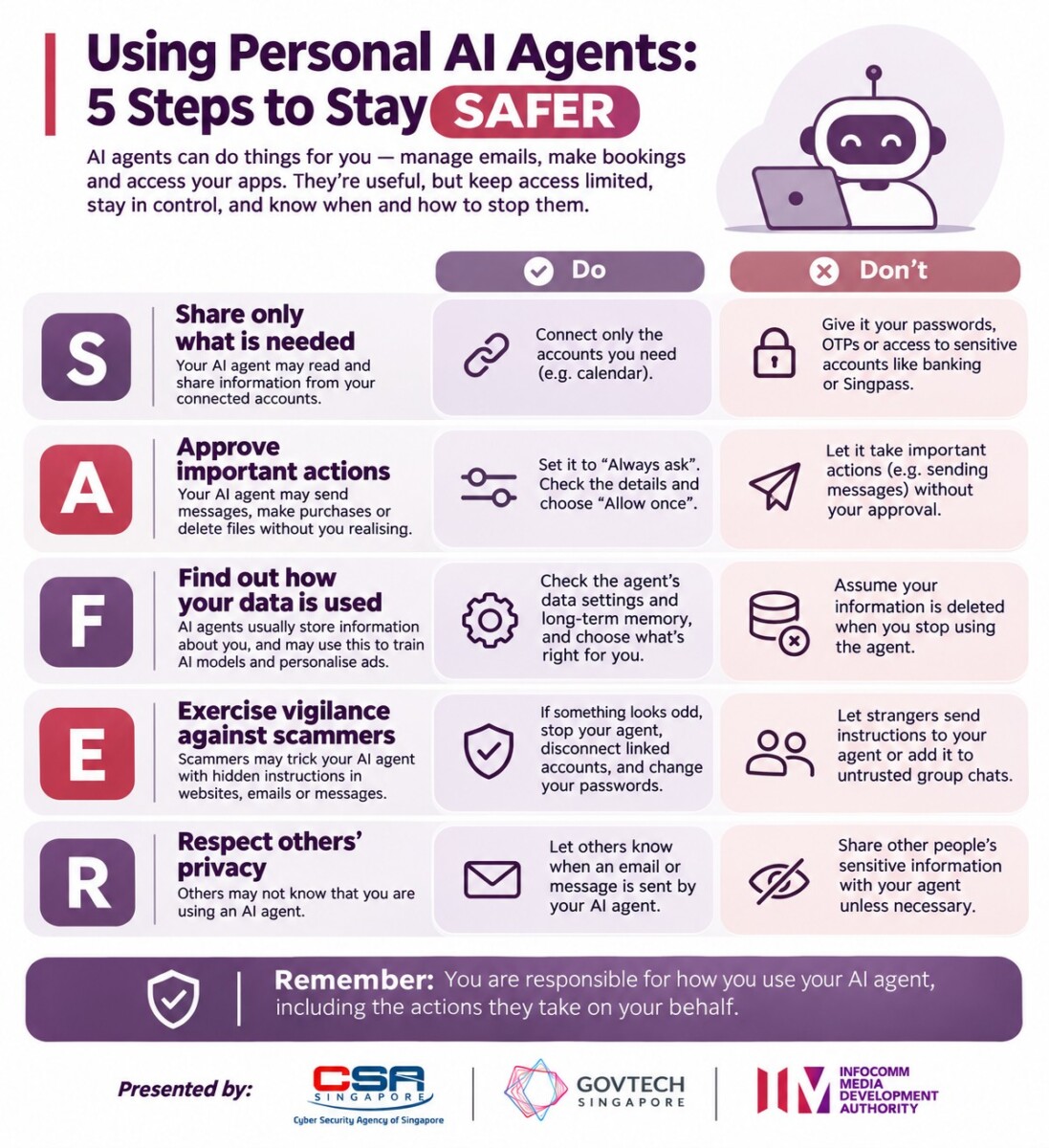
What stays out of an agent’s reach
The first of five steps is about access. Connect only the apps an agent needs for the job, start with low-risk accounts such as a secondary email address, and keep it away from banking, government and healthcare accounts. For work accounts, check if your employer allows it.
Credentials are off limits, and that includes files, emails and messages where passwords are stored. For Singpass services, the advice is passkey login by default, with the user completing authentication personally and refusing unexpected requests. There is a catch in the inbox: an agent connected to an email account that receives OTPs can read them, so the agencies suggest a separate address for OTPs on sensitive accounts. Credit card details stay out as well.
Approval settings, not chat instructions
Step two is control. Start with limited or read-only permissions where possible, require approval before an agent sends messages, deletes or shares files or posts publicly, and choose one-time approval over “always allow”.
The line that matters most for anyone already running an agent is this: “Do not rely solely on chat instructions to limit your agent’s actions, as these may not always be followed consistently.” Limits belong in the settings of the agent app and of the service it touches, such as Gmail.
Memory, data and hidden instructions
Step three asks users to find out what data an agent collects, who receives it, how long it is kept, and whether chat history and connected accounts are used to train models or personalise ads. Agents with persistent memory build profiles of their users and of the people around them, and those memories can be deleted.
Step four deals with scammers who target the agent instead of the person, hiding instructions in websites, emails, calendar invitations, messages, documents or images to make it buy something, move money or leak data. Keep agents out of group chats with people you do not trust, download them only from official sources and avoid untrusted add-ons. OpenClaw users have a separate CSA advisory of their own.
When an agent misbehaves, the order is to stop it, disconnect affected accounts both in the agent and in the accounts themselves, change passwords, sign out of all sessions and look for unfamiliar payments, payees, email forwarding rules or new devices. The ScamShield Helpline is 1799 and the Singpass Helpdesk is 6335 3533. Hacked devices and accounts go to SingCERT through CSA’s Cyber Aid form.
Telling people a bot wrote it
Step five is about everyone else. Users should make clear when an email or message was sent by an AI agent, and should not ask an agent to get round paywalls or login walls on other sites.
Because menus differ between products, an annex maps common setting names, from Connectors and Integrations to Always allow, Memory and Activity log, onto each step. The full advisory sits on CSA’s website as advisory AD-2026-015.